Tuesday, 26 June 2018

The Ultimate Guide to Email Marketing

The first marketing email was sent in 1978, resulted in $13 million in sales, and kicked off what has become one of the most highly used marketing channels even to this day. Given its early beginnings, email isn’t as shiny as some newer channels like messaging and social, but it is an effective way to build an owned audience that gets results.

Email isn’t dead. It’s one of the few marketing channels we can use to build an authentic connection with the humans that keep our businesses alive.

Email marketing isn’t spam. It’s not a personal note from an old colleague either. It’s something in between. Your customers don’t give their information lightly, and — if used right — email marketing can be both a relationship-building and profit-building tool.Click here to download our free checklist for writing perfect marketing emails.

You should use email to build upon an existing relationship with your subscribers and leads by providing relevant, valuable information that will help them take action on their goals.

That’s right, email marketing isn’t just about you, or your company. It’s about your customer.

If you keep this golden rule in mind, your subscribers will not only read your emails, but they will look forward to hearing from you every time.

Let’s dive into why email marketing is still one of the most important elements of your marketing strategy and how you can use it responsibly and effectively.

Here are some stats that prove how effective email marketing can be:

Unless you have the (wo)manpower, free time, and capital to individually build a personal relationship with each one of your prospects and customers, email should be your best marketing friend.

Use Cases for Email Marketing

Here are the many ways you can (and should) use email:

  • Build Relationships: Build connections through personalized engagement.
  • Brand Awareness: Keep your company and your services top-of-mind for the moment when your prospects are ready to engage.
  • Content Promotion: Use email to share relevant blog content or useful assets with your prospects.
  • Lead Generation: Entice your subscribers to provide their personal information in exchange for an asset that they’d find valuable.
  • Product Marketing: Promote your products and services.
  • Lead Nurturing: Delight your customers with content that can help them succeed in their goals.

Getting Started with Email Marketing

Before you get overwhelmed with the vast possibilities of email marketing, let’s break down a few key things to get you started building an strong email campaign that will delight your customers.

Create an Email Marketing Strategy

Each of your customers receives 121 emails every day. That means, if you don’t take the time to develop a strategy, your emails will get lost in crowded inboxes, or worse, be sent to the spam folder.

You can learn how to build an effective email strategy and send emails that people actually want to read. It just takes a plan (one that can be broken down into a few categories).

Think of the following five categories as an outline for your email strategy. We’ll dive deeper into some of these in a moment.

1. Define Your Audience

An effective email is a relevant email. Like everything else in marketing, start with your buyer persona, understand what they want, and tailor your email campaign to your audience’s needs.

2. Establish Your Goals

Before you come up with your campaign goals, gather some context. Research the average email stats for your industry and use them as benchmarks for your goals.

email marketing mean open rate by industry
email marketing mean click-through rate by industry
 Source: HubSpot

3. Create a Way for People to Sign Up

You need people to email, right? An email list is a group of users who have given you permission to send them relevant content. To build that list, you need several ways for prospects to opt in to receive your emails.

Don’t be discouraged if you only have a few people on your list to start. It can take some time to build. In the meantime, treat every single subscriber and lead like gold, and you’ll start to see your email list grow organically.

4. Choose an Email Campaign Type 

Email campaigns vary and trying to decide between them can be overwhelming. Do you send a weekly newsletter? Should you send out new product announcements? Which blog posts are worth sharing?

These questions plague every marketer. The answer is subjective. You can start by learning about the different types of email campaigns that exist, then decide which is best for your audience. You should also set up different lists for different types of emails, so customers and prospects can sign up for only the emails that are relevant to them.

5. Make a Schedule

Decide how often you plan to contact your list, inform your audience upfront so they know what to expect, and stick to a consistent schedule to build trust, and so they don’t forget about you.

6. Measure Your Results

This should come as no surprise. As marketers, we measure everything. Being meticulous about every key metric will help you make small changes to your emails that will yield large results. We’re going to touch on the exact KPIs to monitor in a bit (or you can simply jump ahead).

Build Your Email List

Now to the fun part: filling your email list with eager prospects that are excited to hear from you.

There are many creative ways to build your email list (and, no, purchasing emails ain’t one). Tactically speaking, list building comes down to two key elements that work cohesively to grow your subscriber numbers: lead magnets and opt-in forms.

Lead Magnets

Your lead magnet is exactly as it sounds: something that attracts prospects to your email list, usually in the form of a free offer. The offer can take a number of formats, should be valuable to your prospects, and is given away for free in exchange for an email address.

There’s just one problem: People have become hyper protective of their personal information. You can’t expect to receive an email address without exchanging it for something valuable.

Think about a lead magnet that is relevant, useful, and makes your prospects’ lives easier.

Here are a few types of lead magnets you could create:

  • Ebook
  • Whitepaper
  • Infographic
  • Report or Study
  • Checklist
  • Template
  • Webinar or Course
  • Tool

If you’re short on resources, you can even repurpose your existing content to create lead magnets.

How to Create a Great Lead Magnet

Remember that your lead magnet should be relevant to your prospects. Here are a few guidelines to ensure you’re creating a valuable asset for your potential list.

1. Make your offer solution-oriented and actionable.

Provide practical information that solves a problem and create a realistic way to achieve the solution.

2. Ensure that the asset is easy to consume.

Lead magnets should be delivered in a digital format. Whether it’s a PDF, a webpage, a video, or some other format, make it easy for your new lead to obtain and consume it.

3. Create your offer with future content in mind.

There’s nothing worse than signing up for a great offer only to be disappointed by the content that follows. Make sure your offer is aligned with the value that you will provide throughout your relationship, otherwise you risk damaging trust.

4. Treat your lead magnet as a stepping stone to your paid solution.

The point of your email list is to eventually guide subscribers to a paid offer. You offer free content to demonstrate the value that you provide as a company, and those free offers should eventually lead to your product or service.

5. Create offers that are relevant to each stage of the buyer’s journey.

Every new lead will be at a different stage of the buyer’s journey, and it’s your responsibility to know which. Segment your list from the beginning by providing separate opt-in offers that pertain to each stage of the buyer’s journey. You can tell a lot about a prospect’s mindset by the content they consume.

How to Create an Enticing Opt-in Form

Your opt-in form is how you get a prospect’s information to add them to your list. It’s the gate between your future leads and the incredible asset that you created with them in mind.

Create an attractive design and attention-grabbing header.

Your form should be branded, stand out from the page, and entice people to sign up. You want to excite readers with the offer.

Make the copy relevant to the offer.

While your goal is to get people to enter their information, it isn’t to deceive them. Any information on your form should be a truthful representation of the offer.

Keep the form simple.

This could be one of your first interactions with your prospect. Don’t scare them away with a long form with several fields. Ask for only the most essential information: first name and email is a good place to start.

Set your opt-in form for double confirmation.

It may seem counterproductive to ask your subscribers to opt in to your emails twice, but a study on open rates proves that customers prefer a confirmed opt-in (COI) email 2.7X more than a welcome email.

Ensure that the flow works.

Take yourself through the user experience before you go live. Double check that the form works as intended, the thank you page is live, and your offer is delivered as promised. This is one of your first impressions on your new lead — make it a professional and positive one.

Email Marketing Best Practices

If all goes well, you’ll have built a robust list of subscribers and leads that are waiting to hear from you. But you can’t start emailing just yet unless you want to end up in a spam folder, or worse, a blocked list.

Here are a few extremely important things to keep in mind before you start emailing your precious list that you worked so hard to build.

Email Marketing Tips

While you probably don’t think twice about the formatting or subject line of an email you send to a friend, email marketing requires a lot more consideration. Everything from the time you send your email to the devices on which your email could be opened matters.

Your goal with every email is to generate more leads, which makes crafting a marketing email a more involved process than other emails you’ve written.

Let’s touch on the components of a successful marketing email:

Subject Line: Use clear, actionable, enticing language that is personalized and aligned with the body of the email.

Copy: The copy in the body of your email should be consistent with your voice and stick to only one topic.

Images: Choose images that are optimized for all devices, eye-catching, and relevant.

CTA: Your call-to-action should lead to a relevant offer and stand out from the rest of the email.

Timing: Based on a study that observed response rates of 20 million emails, Tuesday at 11 AM ET is the best day and time to send your email.

Responsiveness: 55% of emails are opened on mobile. Your email should, therefore, be optimized for this as well as all other devices.

Personalization: Write every email like you’re sending it to a friend. Be personable and address your reader in a familiar tone.

Email Segmentation

Segmentation is breaking up your large email list into sub categories that pertain to your subscribers’ unique characteristics, interests, and preferences.

Our subscribers are humans, after all, and we should do our best to treat them as such. That means, not sending generic email blasts.

We talked about segmentation briefly above. The reason why this topic is important enough to mention twice is that, without it, you run the risk of sending the wrong content to the wrong people and losing subscribers.

Why Should You Segment Your List?

Each person who signs up to receive your emails is at a different level of readiness to convert into a customer (which is the ultimate goal of all this).

If you send a discount coupon for your product to subscribers that don’t even know how to diagnose their problem, you’ll probably lose them. That’s because you’re skipping the part where you build trust and develop the relationship.

Every email you send should treat your subscribers like humans that you want to connect with, as opposed to a herd of leads that you’re trying to corral into one-size-fits-all box.

The more you segment your list, the more trust you build with your leads and the easier it’ll be to convert them later.

Not to mention, segmented emails generate 58% of all revenue.

How to Segment Your List

The first step in segmentation is creating separate lead magnets and opt-in forms for each part of the buyer’s journey. That way, your contacts are automatically divided into separate lists.

Beyond that, email marketing platforms allow you to segment your email list by contact data and behavior to help you send the right emails to the right people.

Here are some ways you could break up your list:

  • Geographical location
  • Lifecycle stage
  • Awareness, consideration, decision stage
  • Industry
  • Previous engagement with your brand
  • Language
  • Job Title

In reality, you can segment your list any way that you want. Just make sure to be as exclusive as possible when sending emails to each subgroup.

Personalization

Now that you know who you’re emailing and what’s important to them, it will be much easier to send emails with personalized touches.

Sure, you’re speaking to 100+ people at one time, but your leads don’t need to know it.

To really drive this point home, consider this: Personalized emails have 26% higher open rates, and an improved click-through rate of 14% when compared to others.

You’ve gathered all this unique data. Your email marketing software allows for personalization tokens. You have no excuse for sending generic emails that don’t make your leads feel special.

Here are a few ways to personalize your emails:

  • Add a first name field in your subject line and/or greeting
  • Include region-specific information when appropriate
  • Send content that is relevant to your lead’s lifecycle stage
  • Only send emails that pertain to the last engagement a lead has had with your brand
  • Write about relevant and/or personal events, like region-specific holidays or birthdays
  • End your emails with a personal signature from a human (not your company)
  • Use a relevant call-to-action to an offer that the reader will find useful

Automation

Automation is putting your list segmentation to use. Once you’ve created specific subgroups, you can send automated emails that are highly targeted. There are a couple ways to do this.

1. Autoresponders

An autoresponder, also known as a drip campaign, is a series of emails that is sent out automatically once triggered by a certain action, for instance, when someone downloads your ebook.

You’ll use the same guidelines for writing your emails that we discussed previously to ensure that your readers find your emails useful and interesting. You should decide how far apart you’d like your emails to be sent, say every few days or weeks or even months.

The great thing about autoresponders is that you can set it and forget it. Every user that is part of your autoresponder will receive each email that you’ve added to the series.

2. Workflows

Workflows take autoresponders a step further. Think of Workflows like a flow tree with yes/no branches that will execute actions based on the criteria that you set.

Workflows have two key components: 1. Enrollment criteria, or the action that would qualify a user for the workflow. 2. Goal, or the action that would take a user out of the workflow.

Workflow tools are smart enough to know if a user opened an email or downloaded an offer, and it will set off a series of actions based on that behavior. That means, it can send an email series, or even change a prospect’s lifecycle stage based on what a user does.

Here’s an example of how a workflow could be set up:

email marketing workflowSource: HubSpot

The key difference from an autoresponder is that workflows are smart: They can change the course of your automated series based on what your prospect will find useful. For instance, if a new subscriber receives a welcome email and the subsequent email is set up to send them an offer that they already found and downloaded on your site, the workflow tool will know and adapt. In an autoresponder, a user receives a specific set of emails at specific time intervals no matter what action they take.


Why is this important? Sending the right email at the right time is detrimental to your bottom line. Companies see a 20% increase in revenue when they send emails based on lifecycle stages.

Email Regulations You Should Follow

Email regulations are consistent with consumers’ desires to know how and why their information is being used. If there’s anything we care about, it’s complying with what our customers—or potential customers—want.

CAN-SPAM Compliance

Technically, CAN-SPAM is an acronym for Controlling the Assault of Non-Solicited Pornography and Marketing (because sometimes the two go together).

In practice, it’s a way to protect your subscribers’ right to only receive emails that they’ve requested.

The law was passed in 2003 and applies to any commercial emails used for business purposes.

Here are the ways to ensure that your emails are CAN-SPAM compliant:

  1. Include your company name and address in every email.
  2. Place visible unsubscribe links within your emails.
  3. Use real email addresses in the “From” and “Reply to” fields.
  4. Write subject lines that indicate the contents of the email.

Please note: This is not to be confused for legal advice. See the FTC’s site for more specific legal information regarding CAN-SPAM laws.

GDPR Compliance

“GDPR is wholly consistent with the inbound approach to business” - Brian Halligan, HubSpot CEO

While some may view these newly implemented email regulations as burdensome and unnecessary, General Data Protection Regulation (GDPR) actually moves us closer to building long-lasting and trusting relationships with our customers.

GDPR is about giving your customers the right to choose. They choose your emails. They choose to hear from you. They choose your products. And that is exactly what inbound marketing is about.

Something important to note about GDPR is that it only applies to businesses that operate in the European Union and businesses that market to EU citizens. Noncompliance will result in significant fees that aren’t worth the risk, so make sure read the GDPR guidelines entirely.

Here’s an overview of how you can comply with GDPR laws:

  • Use explicit and clear language when requesting consent to store personal information.
  • Only collect contact data that is necessary for and relevant to your business.
  • Store contact data in a secure manner and only use it for the agreed-upon purpose.
  • Retain data for justifiable business purposes only.
  • Delete contact data on request.
  • Make it easy for contacts to unsubscribe from your list or update their preferences.
  • Comply promptly to a contact’s request for access to their data.
  • Keep company records to prove GDPR compliance.

These regulations will be taken seriously (as they should), so it’s a good idea to create a GDPR strategy for your business before you start sending out emails.

How to Avoid Spam Filters

You spend time creating the perfect email and adhering to regulations, so the last thing you want is to end up in a spam folder.

You'll want to avoid the spam folder because:

  • It hurts your deliverability rates across the board.
  • Your contacts will likely miss all of your emails.
  • You won’t be able to accurately measure your email marketing effectiveness.
  • Your analytics will be skewed.

You can avoid being deduced to spam by:

Getting whitelisted.

A whitelist is the opposite of a blacklist, meaning it’s a list of approved senders that are allowed to reach the subscriber’s inbox. The easiest way to accomplish this is to have your new subscriber add your email address to their address book. Include directions on how to do this in your welcome email.

Minding your copy.

Avoid using all caps and multiple exclamation points, as well as spam trigger words, like “opt in”, “click below”, and “order”, that are easily detected and marked down by Internet Service Providers (ISPs).

Using a reliable email service provider.

Your email service provider’s reputation affects your deliverability, so stick to established, well-known companies.

Implementing a double opt-in.

After someone opts in to your email list, send an email asking them to confirm. This ensures that your new subscriber is genuinely interested in your emails and will likely be more engaged.

Check out more ways you can avoid the spam filter.

Analyzing Your Email Marketing Results

As marketers, we love to analyze everything. It helps inform our marketing decisions and justify our work to the rest of the company.

Here are the best ways to analyze the effectiveness of your email marketing campaigns.

A/B Testing

Not all email lists are created equal. Some audiences prefer personalization and others will think it’s spammy. Some audiences will like bright, eye-catching CTA buttons, and others will prefer a more subtle call-to-action.

You’ll never know what type of people make up your email list until you test the variables. That’s where A/B testing comes in handy.

A/B testing, or split testing, is a way to see what type of email performs best with your audience by analyzing the results of email A against email B.

Here’s the step-by-step process for A/B testing your emails:

  1. Select one variable to test at a time, e.g., subject line, CTA, images.
  2. Create two versions of the email: one with and one without the variable.
  3. Allow your emails to be sent out simultaneously for a period of time.
  4. Analyze your results and keep only the version that performed better.
  5. Test a new variable and repeat the process.

Most email service providers will have A/B testing built into their software, which will make it easy for you to compare email results without much manual work.

Email Marketing KPIs

There are four keys metrics to pay attention to when evaluating the effectiveness of your email marketing campaign.

  1. Deliverability measures the rate at which emails reach your intended subscribers’ inboxes.
  2. Open rate is the percentage of people that open your email once it reaches their inbox.
  3. Clickthrough rate (CTR) is the percentage of people that click on your CTAs.
  4. Unsubscribes measures the number of people who opt out of your email list once they receive an email from you.

How to Improve Your Email Results

Many factors impact your KPIs, and it’s going to take some experimentation and guesswork to figure out which tweaks to your emails will yield that biggest changes.

If you aren’t getting the numbers you want, try playing with these variables to improve your email results.

Deliverability

  • Ensure that you’re following best practices when it comes to avoiding spam filters.
  • Remove inactive people from your email list to keep only engaged subscribers.
  • Check which emails hard-bounced and remove those email addresses from your list.

Open Rate

  • Play with the language in your subject line to entice people to click on your email.
  • Adjust the time and day that you send your email to see what works best.

Clickthrough Rate (CTR)

  • Evaluate your offer to ensure that it provides value to your segmented list.
  • Rewrite your copy to make sure that it’s clear what you want the reader to do.
  • Try different CTAs, e.g., graphic versus Inline copy, bold versus subtle.

Unsubscribes

  • First, consider if this a blessing in disguise, as uninterested parties are removing themselves from your list.
  • Evaluate whether the email you sent is aligned with your brand.
  • Ensure you haven’t performed a bait-and-switch by promising one thing and delivering another.
  • Make sure your emails are providing value to your audience before trying to upsell.

Email Marketing Report Template

Your data does no good if you can’t report it in an organized fashion.

An email marketing report is a spreadsheet where you can record your results in one place to help you make inferences from your KPIs and take action to improve them.

Here’s how you should organize your report:

Metrics

  • Total number of emails sent
  • Number of emails delivered
  • Deliverability Rate
  • Bounce Rate
  • Open Rate
  • Clickthrough Rate
  • Unsubscribe Rate

Data

  • Subject line
  • Length of email body
  • Offer
  • CTA (inline or graphic)
  • List segment

Questions to Ask

  • Was your deliverability rate high in comparison to previous periods?
  • How did your CTR compare to your open rate?
  • Were your unsubscribe numbers consistent with other emails?
  • Did a certain subject line perform better than others?
  • Does the length of email make a difference in CTR?
  • Could another style of CTA perform better?
  • Was the offer appropriate for the list segment?

Email Marketing for SMBs

Email marketing rules change based on your industry and who you’re marketing to. Below are some email marketing trends for B2B, B2C, ecommerce, and real estate companies that can inform your email marketing strategy.

Email Marketing Stats for B2B

  • Emails that are triggered by an action perform 3X better than nurture emails or drip campaigns
  • For 86% of professionals, email is their preferred communication channel
  • 60% of marketers believe that email marketing produces a positive ROI
  • Clickthrough rates are 47% higher for B2B emails than B2C
  • Subject-line emojis accounted for increased open rates for 56% of brands

Email Marketing Stats for B2C

  • 78% of consumers have unsubscribed from lists because a brand was sending too many emails
  • Over 90% of consumers check their emails daily
  • Video increases CTR by 64.8%
  • Email subscribers are 3X more likely to share social content than others

Email Marketing Stats for eCommerce

  • 66% of consumers have made a purchase as a result of an email marketing message
  • 320% more revenue can be attributed to a welcome email than a promotional email
  • 86% of consumers would like to receive a promotional email from brands they subscribe to at least once per month
  • Segmented emails generate 58% of company revenue

Email Marketing Stats for Real Estate

  • 63% of real estate businesses use email marketing
  • The majority (53%) of real estate companies obtain subscribers from their website
  • Businesses that blog get twice as much traffic from email as those that don’t
  • 40% of real estate companies use list segmentation

Best Email Marketing Services

Email Marketing Companies

Now that you understand email marketing in its entirety, you need to select a company that offers everything you need to create your best email marketing campaign. When choosing an Email Service Provider (ESP), make sure it has the following features:

  • CRM platform with segmentation capabilities
  • Good standing with Internet Service Providers
  • A positive reputation as an email service provider (ESP)
  • Easy-to-build forms, landing pages, and CTAs
  • Automation
  • Simple ways to comply with email regulations
  • Ability to split test your emails
  • Built-in analytics
  • Downloadable reports

Email Marketing Templates

Templates take the design, coding, and UX-definition work out of crafting your emails. Unless you’re a designer and developer on top of being a skilled marketer, templates will save you a ton of time.

Just one caveat: when making your selection, choose email templates that are proven to be effective. Quality templates come from reputable ESPs that have tested them against thousands of alternatives. So, stick with the professionals.

Email Marketing Examples

Some of the best email marketing campaigns have employed all of the great tips that we went over above. Check out some great email marketing examples to get some inspiration for your next campaign.

Conclusion

While there are many rules to sending a marketing email, the most important is this: Treat your subscribers like humans.

You can achieve all of your email marketing goals if you keep this golden rule top-of-mind in every autoresponder, lead magnet, and subject line.

Your subscribers want to hear from you, and they want to relate to you. Be a genuine resource, and they will look forward to opening an email from you just like they would any friend of theirs.

Free Download Write the Perfect Email


[Read More ...]

How to Get Your Boss to Actually Listen to You

Bosses don’t know everything. Even the most empathetic leaders need feedback to understand the specific challenges their employees face. Unfortunately, plenty of workers — especially those new to the workforce — don’t feel safe being vocal. When they have ideas to contribute, they hesitate to share them; after all, they don’t want to risk potential repercussions.

Ultimately, this environment leads to erosion of communication between team members and even entire companies. People assume their suggestions won’t be met by someone who appreciates their feedback, so concerns remain unspoken. At the same time, each unnoted issue can cost businesses $7,500 per incident, on average. Over time, a human disconnect and financial draining system develops, creating a gap that grows larger each year. The only way to bridge the chasm if you’re not a top dog? Speak up.Click here to download leadership lessons from HubSpot founder, Dharmesh Shah.

Not surprisingly, workers seldom take that route. A VitalSmarts study found that only 1 percent of respondents were willing to break the mold; roughly three out of 10 cited a negative organization as the reason for their silence. Anyone who’s seen a colleague punished for being honest knows how quickly open dialogue can shut down; thus, it can be tough to become the turtle willing to stick its neck out.

Ironically, this is exactly the reason you need to take control of the situation and be the one to buck the “silent treatment.” Despite surveys, open-door policies, one-on-one meetings, brainstorming sessions, and other planned events, leaders depend on the voices of proactive, loyal employees — even if they don’t realize it. No company succeeds if its people stop managing up and regularly sharing ideas; talented performers have jumped ship for far less important reasons.

For instance, take a lesson from our company’s business development manager: Like an assertive jet pilot, he consistently keeps himself on my radar. Together, we’ve discussed ways to make our conversations more effective so they focus on productivity. Without his willingness to tell me what I don’t know, our organization would suffer.

Learning to ‘Manage Up’

Whether you’re an extrovert, an introvert, or just someone who’s tired of (and stressed by) holding everything in, you owe it to yourself and your company to find your voice. By following a few guidelines, you can confidently bring up issues with your supervisor — and feel better about your job altogether — without losing sleep:

1. Ready to complain? Take a different tactic.

You might have a list of criticisms or grievances; that’s understandable. However, before you blow up in your meeting, plan to stay in control. Clarify each pain point ahead of time by writing it down. Often, employees lump natural job stressors with programmatic or organizational issues. Divvy them up, and only speak of the latter.

2. Articulate your concerns in a solution-oriented way.

Forget the idea of merely bringing issues to the table. Go a step further and offer solutions, too. Don’t assume your role is to dump concerns onto your corporate leaders and walk away. Instead, have the poise to lean on your expertise and provide solutions. Not only will this show your self-assurance, but it will also help your employer. When researchers studied a restaurant chain in which leadership actively listened to managers and implemented their suggestions, they discovered a 32 percent decrease in turnover and savings of no less than $1.6 million.

3. Commiserate sparingly with peers.

Everyone knows the Negative Neds or Nellies in the office. Their pessimism spreads like cancer, killing productivity and morale. And their professional reputation? Forget it. If you’re going to become a voice to upper management, temper your desire to vent all the time. Although griping makes sense from time to time — and can even be productive under the right circumstances — it doesn’t solve anything. Rather than whine incessantly, allow yourself a bit of kvetching and then move on to developing a viable result.

4. Leverage anonymous feedback.

If you’re hesitant to reveal your identity by marching into your supervisor’s domain, you have a less direct way to make yourself heard. Most companies offer a suggestion box, allowing you to provide the same information you would face to face in written form. You can also write a review on Glassdoor to give your feedback anonymously. Although it’s not as productive as having a direct conversation, you’ll still have a say. Be sure to avoid anger with your words; write concisely and stick to facts for optimum results.

Yes, it’s tough to stand out when others hold their tongues; still, saying nothing will only dampen your business’s effectiveness and keep you from achieving your own objectives. Take charge of your career by moving out of your comfort zone. Your co-workers — and boss — might thank you for your candor.

This post originally appeared on Glassdoor, and has been republished with permission.

 New Call-to-action


[Read More ...]

Flexible Schedules: The Good, Bad, & the Surprising

There’s plenty of science to suggest flexible work schedules are critical for happier, more productive employees, and a more successful company overall.

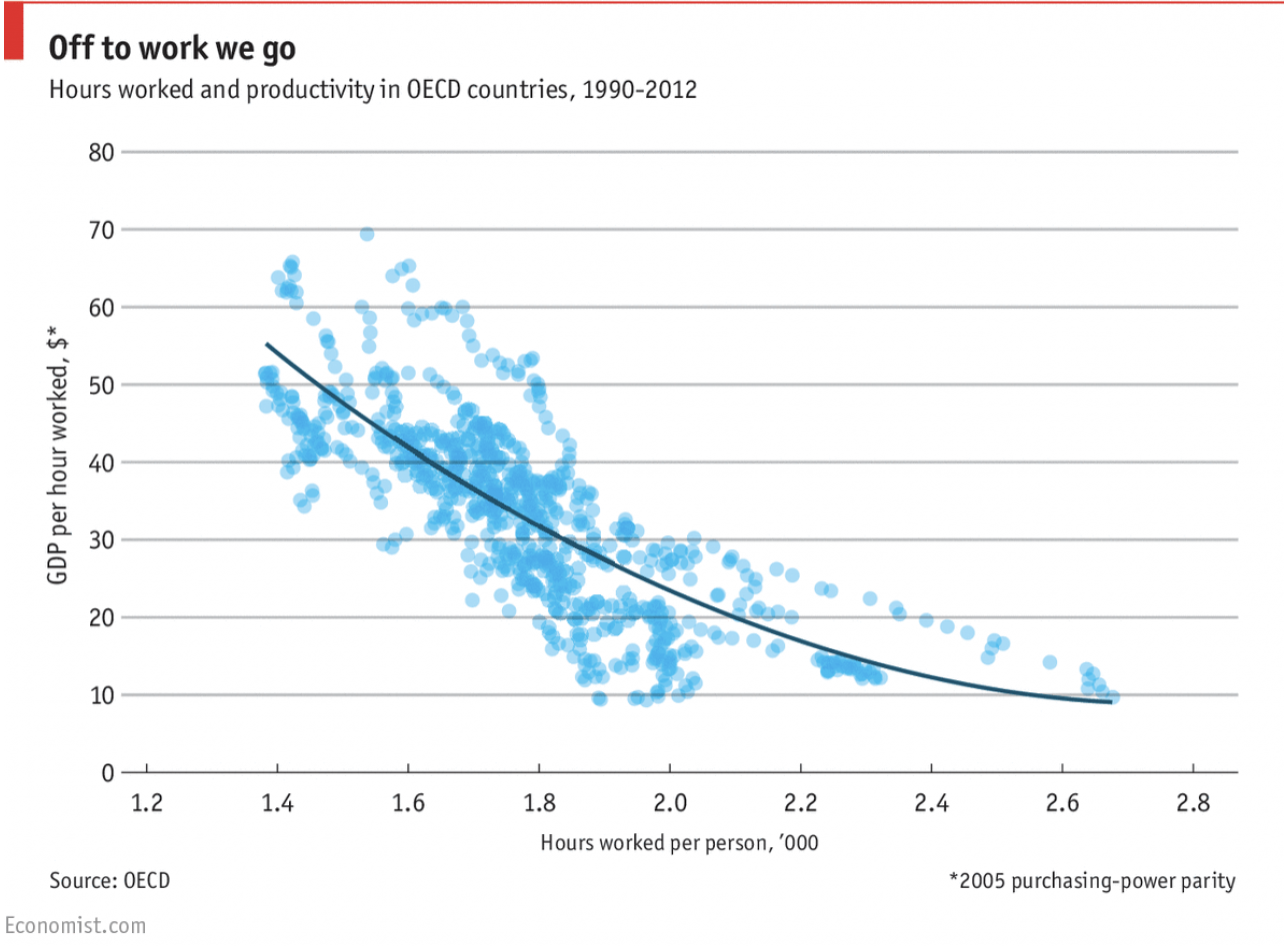
For instance, take a look at this graph from The Economist, which shows that working fewer hours correlates with higher levels of productivity in the form of increased GDP (gross domestic product). I guess there’s something to be said for the old “work hard, play hard” motto.

Additionally, Jabra, a Denmark-based electronics company, found that, in 2018, four times more employees believe working from home to be the most productive option, compared to people’s perceptions in 2015. In recent years, more people prefer to work from home and believe it to be more productive than working in an office.Download our complete productivity guide here for more tips on improving your productivity at work.

But let’s put the data aside for a second. I’m willing to bet we’ve all had those afternoons when we’ve felt entirely unproductive, but still sat at our desks until five p.m. anyway just to clock in the hours.

Or, we’ve wished we could have the mornings free to run errands and spend time with family, but a traditional work schedule doesn’t leave us the option to meet those demands.

Ultimately, we’ve all been in situations where our rigid work schedule has been a hinderance to our productivity in the office, and our priorities outside of it. A flexible work schedule could allow you to work when you’re most productive, and give you the autonomy you need to create an ideal work-life balance, however that looks to you.

There are pros and cons to flexible schedules, just like there are pros and cons to a rigid nine-to-five job. But, as the Jabra study indicates, flexible schedules are becoming more typical nowadays, so we’ve compiled a list of everything good, bad, and surprising about implementing flexible work hours at your office.

Flexible Schedules: The Good

1. You can adapt your schedule to fit family needs.

If you make your own hours, you can ensure those hours adapt to your family and social life demands. For instance, we have parents at HubSpot who make their hours fit around their children’s daycare schedules: they work early in the morning, take a break in the afternoon to pick up their kids, and then resume work later in the evening. Or perhaps your flex schedule is less rigid than that -- maybe you just want time to see your son’s soccer games, or your sister’s graduation, and you need flexibility to manipulate your work schedule without taking time off.

Emily MacIntyre, HubSpot’s Marketing Team Development Manager, agrees that there are pros and cons to flexible schedules in regards to parenting: “There are often in-office events after work that I have to miss out on, because I need to be home. But I get to see my daughter, and spend time with her each night, so it’s a trade-off.”

Ultimately, a flexible schedule can go a long way towards maintaining a healthy work-life balance and protecting important relationships in your life.

2. You can indulge in self-care.

It might sound strange, but having the option to occasionally put your personal needs before work can help you find more joy throughout your day. Plus, in a University of Warwick study, happiness made people approximately 12% more productive. Self-care can be anything from a noon cycling class to finding time to meditate in the park -- anything that makes you feel better able to tackle your responsibilities with a clear mind.

3. Your employees can pursue passions outside of work.

Unfortunately, your employee’s passions can’t always fit outside a nine-to-five work schedule. Sometimes that poetry class starts at four, and other times your hiking group leaves at noon on a Friday.

There are a few reasons it’s important to give employees the freedom to pursue other passions. First, passion can encourage innovative ideas. The more well-rounded your employees are, the more likely they are to apply unconventional solutions to your company’s problems. Also, as previously mentioned, happier employees are more productive. And, third, if your employees can find outlets outside of work to pursue their passions, they’re less likely to feel unsatisfied in their current role.

4. Your employees can work whenever they’re most productive.

For me personally, this is the single most important benefit to flexible schedules: I work insanely well in the mornings. On some mornings, it feels like I can finish two-weeks worth of work before noon. But then, around three or four p.m., it becomes a struggle to even write a grocery list. My brain just doesn’t seem to function past that time. On the other hand, one of my coworkers does best when he can come into the office around 10 a.m., and then work, head-down, later into the night.

Tony Schwartz, author of The Way We're Working Isn't Working, writes about the importance of working like a sprinter. He says it’s important to work intensely and distraction-free for a period of time, but equally critical to take regular renewal breaks to recover from that intense work period.

Ultimately, your employees aren’t all going to be productive at the exact same time. Flexibility allows them to become better workers -- they will get everything accomplished during the hours they want, and they won’t feel burnt out from sitting at their desks during times they are unproductive.

5. Your employees can avoid rush hour.

This might seem trivial, but it’s not -- in 2017 in Boston alone, a rush hour commuter wasted approximately two and a half full days out of a year sitting in a car. That’s almost a full 60 wasted hours where they could have been spending time mentally preparing for their day. A truly painful commute could even eventually drive employees to search for companies closer to home or with different hours. An easy way to improve employee satisfaction is to allow commuters the option to avoid traffic by leaving even just thirty minutes later.

One study by McGill University’s Charis Loong and colleagues found that “satisfaction with travel mode is associated with higher odds of feeling energized and being punctual,” and “the strain of the daily commute can negatively impact performance at work.” Unfortunately, a terrible commute can interfere with your employee’s levels of energy and productivity, so it’s important to consider alternative options.

6. You give employees a sense of autonomy.

People like control over their schedules -- it enables them to feel fully in charge of their work and personal lives, and makes them feel like their company trusts them. HubSpot’s Culture Code recognizes the importance of autonomy, saying, “Results matter more than the number of hours we work. Results matter more than where we produce them.” And, referring to the Economist graph we mentioned earlier, we can see it’s true -- people are more productive even when they work fewer hours, so why not let people choose whichever time they need to commit to deliver the best results?

Siobhán McGinty, a Campaign Marketing Manager in HubSpot's Dublin office, says her flexible schedule gives her the opportunity to “live my best life. I enjoy getting up at 7 a.m., clearing my emails, enjoying my coffee and getting some work out of the way early on in the day. I also enjoy taking two hours off in the middle of the day to go to the gym, or do yoga, or -- if it’s pay day -- get a massage.”

7. You can recruit and retain better talent.

Flexible schedules have been shown to increase employee productivity and overall morale. Ultimately, you can use the benefits of a flexible schedule as a selling point for hiring better talent.

The Creative Group surveyed marketing and advertising executives, and found 33% are offered flexible schedules and remote options. Offering flexible schedules is a good way for your company to attract talent and stand out from competitors in the industry, particularly as flex hours and remote work rise in popularity and employees begin to expect it from their next job.

Flexible Schedules: The Bad

We’ve covered seven different ways flexible schedules can benefit both employers and employees. But like any work arrangement, there are also some downsides to consider before committing to becoming a flexible workplace. Here are a few risks associated with flexible schedules.

1. It’s more difficult for you to arrange meetings with your team.

If everyone has different schedules, figuring out everyone’s availability can get tricky -- for instance, perhaps you can’t have any nine a.m. meetings because three people on your team don’t arrive until 10 a.m. This gets even harder if your team works around the globe, or if you need to schedule meetings with clients who work the traditional nine-to-five.

2. Lines between work and life blur more drastically.

Maybe you’re working from home and your roommate asks you to go to a cycling class at noon, and suddenly it’s three p.m. and you’ve still got a ton of work to do. Or maybe your kids interrupt meetings and calls with pleas for trips to the pool. Whatever the case, life intervenes more drastically when you’re working flexible hours, particularly if you’re working remote. Plus, if all the people in your life work nine-to-five, they might try to pressure you into plans that are inconvenient for your schedule, since you “make your own schedule anyway.” Drawing boundaries between personal life and work can get difficult.

Besides having a tough time getting into work mode when you’re tempted by your personal life, it’s also often challenging to shut off “work mode” when you can technically work whenever you want. Maybe it’s eight p.m. and you simply can’t relax when your desk, and all those piles of work, is within view. During those instances, it’s important you separate work from the rest of your life as much as possible, even creating a separate office space and closing the door when you leave.

3. You won’t find much structure at home.

If you’re working remote, there’s very little structure. With that freedom to take breaks, you might suddenly find you’re getting very little done. Working remotely often requires more focus and discipline than working in an office. You’ll need to set your own rigid structure and stick to it, or you might risk your performance sliding as you take more TV breaks or spend precious productivity hours folding laundry.

4. It can be difficult to create a bonded team.

If you’ve got a team that works from wherever, whenever, it can be hard to pencil in time to develop organic, authentic relationships between your team members. It just doesn’t happen as naturally as it would if everyone sat beside one another 9 to 5 and digressed into talks about the latest Bachelorette episode. One way to counteract this is to plan fun corporate team-building activities, but you might still need to work with everyone’s flex hours or remote time.

Siobhán McGinty admits remote work in particular can get lonely, so, “to overcome that, I set up virtual “water cooler chats” with people on the team if I have 15-30 mins between meetings. It also helps to maintain rapport.” She also says she “practiced” going remote by initially working from home a few days a week, and eventually working her way up to full-time remote, and admits while rewarding, it’s also difficult.

Flexible Schedules: The Surprising

We’ve explored some pros and cons of a flexible schedule for employees and employers, but there are some additional surprising facts you should know when deciding if flexible schedules is right for you and your company.

1. The more flexible your employees' schedules are, the longer they’ll work.

If you’re worried about employees taking advantage of flexible hours and working an hour a day before hitting the beach, don’t be -- Heejung Chung, a senior lecturer at University of Kent in the UK, conducted research with her colleague Yvonne Lott, and found there’s a tendency for people with more autonomy over their schedules to work longer hours, regardless of level of influence or job type. In fact, “this increase in working hours was greatest when workers had full atonomy over their working hours.”

One explanation for this is known as the gift exchange theory, which is the idea that you’re grateful when your employer gives you a flexible schedule and you see it as a gift, which you feel obligated to repay by working harder and longer. You want to prove you deserve the flexible schedule, so you push yourself to work over eight hours a day.

2. Flex hours make your employees happier -- and their children.

A study conducted by the American Sociological Review found workers with flex hours slept better, felt healthier, and were less stressed than their nine-to-five counterparts. Overall, the group with flex hours felt happier than the group with a rigid schedule. But, most surprisingly, as noted by the New York Times, is “the effects even cascaded down to employees’ children, who reported less volatility around their own daily stresses; adolescents saw the quality of their sleep improve.” Happiness is contagious, and so is stress, so it makes sense parents with lower levels of stress and higher levels of happiness were able to spread those emotions to their children.

7. It might be harder to get flexible hours if you’re a woman.

A 2014 experiment by Furman University sociologist Christin Munsch showed 600 participants a transcript of a conversation between an employee asking for flexible hours and an HR representative. Shockingly, when participants assumed it was a man asking for flexible time, almost 70% said they’d be likely or very likely to approve the request, compared to 56% when they believed it was a woman making the request. There are other studies supporting the same hypothesis -- that it’s harder for a woman to receive flex time than a man -- here.

Munsch speculated the study’s results come from inherent gender biases when it comes to childcare: the participants might’ve felt impressed by a man’s desire to spend more time at home with children, while they might’ve felt a woman should find a better way to balance her home and work obligations. Of course, this varies immensely company to company and even country to country, but it’s important for employers to keep it in mind if they’re in charge of approving flexible work schedules for employees.

So what now?

Ultimately, providing flexible schedules for employees won’t work for every company or every department. For instance, if your employees work in the services industry and often speak both on the phone and in-person with clients, perhaps you need them to maintain a nine-to-five schedule. Hopefully, weighing these pros and cons will help you make the best decision for your team, or even brainstorm alternative ways to combat some of the negative consequences of a traditional work schedule.

Productivity Guide


[Read More ...]

What Is Digital Marketing?

With how accessible the internet is today, would you believe me if I told you the number of people who go online every day is still increasing?

It is. In fact, "constant" internet usage among adults increased by 5% in just the last three years, according to Pew Research. And although we say it a lot, the way people shop and buy really has changed along with it -- meaning offline marketing isn't as effective as it used to be.

Marketing has always been about connecting with your audience in the right place and at the right time. Today, that means you need to meet them where they are already spending time: on the internet.

Enter digital marketing -- in other words, any form of marketing that exists online.Click here to download our free guide to digital marketing fundamentals.

At HubSpot, we talk a lot about inbound marketing as a really effective way to attract, engage, and delight customers online. But we still get a lot of questions from people all around the world about digital marketing.

A seasoned inbound marketer might say inbound marketing and digital marketing are virtually the same thing, but there are some minor differences. And conversations with marketers and business owners in the U.S., U.K., Asia, Australia, and New Zealand, I've learned a lot about how those small differences are being observed across the world.

How Do You Define Digital Marketing?

Digital marketing is defined by the use of numerous digital tactics and channels to connect with customers where they spend much of their time: online. From the website itself to a business's online branding assets -- digital advertising, email marketing, online brochures, and beyond -- there's a spectrum of tactics that fall under the umbrella of "digital marketing."

Digital Marketing Tactics and Examples

The best digital marketers have a clear picture of how each digital marketing campaign supports their overarching goals. And depending on the goals of their marketing strategy, marketers can support a larger campaign through the free and paid channels at their disposal.

A content marketer, for example, can create a series of blog posts that serve to generate leads from a new ebook the business recently created. The company's social media marketer might then help promote these blog posts through paid and organic posts on the business's social media accounts. Perhaps the email marketer creates an email campaign to send those who download the ebook more information on the company. We'll talk more about these specific digital marketers in a minute.

Here's a quick rundown of some of the most common digital marketing tactics and the channels involved in each one.

Search Engine Optimization (SEO)

This is the process of optimizing your website to "rank" higher in search engine results pages, thereby increasing the amount of organic (or free) traffic your website receives. The channels that benefit from SEO include:

  • Websites.
  • Blogs.
  • Infographics.

Content Marketing

This term denotes the creation and promotion of content assets for the purpose of generating brand awareness, traffic growth, lead generation, and customers. The channels that can play a part in your content marketing strategy include:

  • Blog posts.
  • Ebooks and whitepapers.
  • Infographics.
  • Online brochures and lookbooks.

Want to learn and apply content marketing to your business? Check out HubSpot Academy's free content marketing training resource page.

Social Media Marketing

This practice promotes your brand and your content on social media channels to increase brand awareness, drive traffic, and generate leads for your business. The channels you can use in social media marketing include:

  • Facebook.
  • Twitter.
  • LinkedIn.
  • Instagram.
  • Snapchat.
  • Pinterest.
  • Google+.

Pay-Per-Click (PPC)

PPC is a method of driving traffic to your website by paying a publisher every time your ad is clicked. One of the most common types of PPC is Google AdWords, which allows you to pay for top slots on Google's search engine results pages at a price "per click" of the links you place. Other channels where you can use PPC include:

  • Paid ads on Facebook.
  • Promoted Tweets on Twitter.
  • Sponsored Messages on LinkedIn.

Affiliate Marketing

This is a type of performance-based advertising where you receive commission for promoting someone else's products or services on your website. Affiliate marketing channels include:

Native Advertising

Native advertising refers to advertisements that are primarily content-led and featured on a platform alongside other, non-paid content. BuzzFeed-sponsored posts are a good example, but many people also consider social media advertising to be "native" -- Facebook advertising and Instagram advertising, for example.

Marketing Automation

Marketing automation refers to the software that serves to automate your basic marketing operations. Many marketing departments can automate repetitive tasks they would otherwise do manually, such as:

  • Email newsletters.
  • Social media post scheduling.
  • Contact list updating.
  • Lead-nurturing workflows.
  • Campaign tracking and reporting.

Email Marketing

Companies use email marketing as a way of communicating with their audiences. Email is often used to promote content, discounts and events, as well as to direct people toward the business's website. The types of emails you might send in an email marketing campaign include:

  • Blog subscription newsletters.
  • Follow-up emails to website visitors who downloaded something.
  • Customer welcome emails.
  • Holiday promotions to loyalty program members.
  • Tips or similar series emails for customer nurturing.

Online PR

Online PR is the practice of securing earned online coverage with digital publications, blogs, and other content-based websites. It's much like traditional PR, but in the online space. The channels you can use to maximize your PR efforts include:

  • Reporter outreach via social media.
  • Engaging online reviews of your company.
  • Engaging comments on your personal website or blog.

Inbound Marketing

Inbound marketing refers to the "full-funnel" approach to attracting, engaging, and delighting customers using online content. You can use every digital marketing tactic listed above throughout an inbound marketing strategy.

What Does a Digital Marketer Do?

Digital marketers are in charge of driving brand awareness and lead generation through all the digital channels -- both free and paid -- that are at a company's disposal. These channels include social media, the company's own website, search engine rankings, email, display advertising, and the company's blog.

The digital marketer usually focuses on a different key performance indicator (KPI) for each channel so they can properly measure the company's performance across each one. A digital marketer who's in charge of SEO, for example, measures their website's "organic traffic" -- of that traffic coming from website visitors who found a page of the business's website via a Google search.

Digital marketing is carried out across many marketing roles today. In small companies, one generalist might own many of the digital marketing tactics described above at the same time. In larger companies, these tactics have multiple specialists that each focus on just one or two of the brand's digital channels.

Here are some examples of these specialists:

SEO Manager

Main KPIs: Organic traffic

In short, SEO managers get the business to rank on Google. Using a variety of approaches to search engine optimization, this person might work directly with content creators to ensure the content they produce performs well on Google -- even if the company also posts this content on social media.

Content Marketing Specialist

Main KPIs: Time on page, overall blog traffic, YouTube channel subscribers

Content marketing specialists are the digital content creators. They frequently keep track of the company's blogging calendar, and come up with a content strategy that includes video as well. These professionals often work with people in other departments to ensure the products and campaigns the business launches are supported with promotional content on each digital channel.

Social Media Manager

Main KPIs: Follows, Impressions, Shares

The role of a social media manager is easy to infer from the title, but which social networks they manage for the company depends on the industry. Above all, social media managers establish a posting schedule for the company's written and visual content. This employee might also work with the content marketing specialist to develop a strategy for which content to post on which social network.

(Note: Per the KPIs above, "impressions" refers to the number of times a business's posts appear on the newsfeed of a user.)

Marketing Automation Coordinator

Main KPIs: Email open rate, campaign click-through rate, lead-generation (conversion) rate

The marketing automation coordinator helps choose and manage the software that allows the whole marketing team to understand their customers' behavior and measure the growth of their business. Because many of the marketing operations described above might be executed separately from one another, it's important for there to be someone who can group these digital activities into individual campaigns and track each campaign's performance.

Inbound Marketing vs. Digital Marketing: Which Is It?

On the surface, the two seem similar: Both occur primarily online, and both focus on creating digital content for people to consume. So what's the difference?

The term "digital marketing" doesn't differentiate between push and pull marketing tactics (or what we might now refer to as ‘inbound' and ‘outbound' methods). Both can still fall under the umbrella of digital marketing.

Digital outbound tactics aim to put a marketing message directly in front of as many people as possible in the online space -- regardless of whether it's relevant or welcomed. For example, the garish banner ads you see at the top of many websites try to push a product or promotion onto people who aren't necessarily ready to receive it.

On the other hand, marketers who employ digital inbound tactics use online content to attract their target customers onto their websites by providing assets that are helpful to them. One of the simplest yet most powerful inbound digital marketing assets is a blog, which allows your website to capitalize on the terms which your ideal customers are searching for.

Ultimately, inbound marketing is a methodology that uses digital marketing assets to attract, engage, and delight customers online. Digital marketing, on the other hand, is simply an umbrella term to describe online marketing tactics of any kind, regardless of whether they're considered inbound or outbound.

Does Digital Marketing Work for All Businesses?

Digital marketing can work for any business in any industry. Regardless of what your company sells, digital marketing still involves building out buyer personas to identify your audience's needs, and creating valuable online content. However, that's not to say all businesses should implement a digital marketing strategy in the same way.

B2B Digital Marketing

If your company is business-to-business (B2B), your digital marketing efforts are likely to be centered around online lead generation, with the end goal being for someone to speak to a salesperson. For that reason, the role of your marketing strategy is to attract and convert the highest quality leads for your salespeople via your website and supporting digital channels.

Beyond your website, you'll probably choose to focus your efforts on business-focused channels like LinkedIn where your demographic is spending their time online.

B2C Digital Marketing

If your company is business-to-consumer (B2C), depending on the price point of your products, it's likely that the goal of your digital marketing efforts is to attract people to your website and have them become customers without ever needing to speak to a salesperson.

For that reason, you're probably less likely to focus on ‘leads' in their traditional sense, and more likely to focus on building an accelerated buyer's journey, from the moment someone lands on your website, to the moment that they make a purchase. This will often mean your product features in your content higher up in the marketing funnel than it might for a B2B business, and you might need to use stronger calls-to-action (CTAs).

For B2C companies, channels like Instagram and Pinterest can often be more valuable than business-focused platforms LinkedIn.

What Are the Benefits of Digital Marketing?

Unlike most offline marketing efforts, digital marketing allows marketers to see accurate results in real time. If you've ever put an advert in a newspaper, you'll know how difficult it is to estimate how many people actually flipped to that page and paid attention to your ad. There's no surefire way to know if that ad was responsible for any sales at all.

On the other hand, with digital marketing, you can measure the ROI of pretty much any aspect of your marketing efforts.

Here are some examples:

Website Traffic

With digital marketing, you can see the exact number of people who have viewed your website's homepage in real time by using digital analytics software, available in marketing platforms like HubSpot.

You can also see how many pages they visited, what device they were using, and where they came from, amongst other digital analytics data.

This intelligence helps you to prioritize which marketing channels to spend more or less time on, based on the number of people those channels are driving to your website. For example, if only 10% of your traffic is coming from organic search, you know that you probably need to spend some time on SEO to increase that percentage.

With offline marketing, it's very difficult to tell how people are interacting with your brand before they have an interaction with a salesperson or make a purchase. With digital marketing, you can identify trends and patterns in people's behavior before they've reached the final stage in their buyer's journey, meaning you can make more informed decisions about how to attract them to your website right at the top of the marketing funnel.

Content Performance and Lead Generation

Imagine you've created a product brochure and posted it through people's letterboxes -- that brochure is a form of content, albeit offline. The problem is that you have no idea how many people opened your brochure or how many people threw it straight into the trash.

Now imagine you had that brochure on your website instead. You can measure exactly how many people viewed the page where it's hosted, and you can collect the contact details of those who download it by using forms. Not only can you measure how many people are engaging with your content, but you're also generating qualified leads when people download it.

Attribution Modeling

An effective digital marketing strategy combined with the right tools and technologies allows you to trace all of your sales back to a customer's first digital touchpoint with your business.

We call this attribution modeling, and it allows you to identify trends in the way people research and buy your product, helping you to make more informed decisions about what parts of your marketing strategy deserve more attention, and what parts of your sales cycle need refining.

Connecting the dots between marketing and sales is hugely important -- according to Aberdeen Group, companies with strong sales and marketing alignment achieve a 20% annual growth rate, compared to a 4% decline in revenue for companies with poor alignment. If you can improve your customer's' journey through the buying cycle by using digital technologies, then it's likely to reflect positively on your business's bottom line.

What Types of Digital Content Should I Create?

The kind of content you create depends on your audience's needs at different stages in the buyer's journey. You should start by creating buyer personas (use these free templates, or try makemypersona.com) to identify what your audience's goals and challenges are in relation to your business. On a basic level, your online content should aim to help them meet these goals, and overcome their challenges.

Then, you'll need to think about when they're most likely to be ready to consume this content in relation to what stage they're at in their buyer's journey. We call this content mapping.

With content mapping, the goal is to target content according to:

  1. The characteristics of the person who will be consuming it (that's where buyer personas come in).
  2. How close that person is to making a purchase (i.e., their lifecycle stage).

In terms of the format of your content, there are a lot of different things to try. Here are some options we'd recommend using at each stage of the buyer's journey:

Awareness Stage

  • Blog posts. Great for increasing your organic traffic when paired with a strong SEO and keyword strategy.
  • Infographics. Very shareable, meaning they increase your chances of being found via social media when others share your content. (Check out these free infographic templates to get you started.)
  • Short videos. Again, these are very shareable and can help your brand get found by new audiences by hosting them on platforms like YouTube.

Consideration Stage

  • Ebooks. Great for lead generation as they're generally more comprehensive than a blog post or infographic, meaning someone is more likely to exchange their contact information to receive it.
  • Research reports. Again, this is a high value content piece which is great for lead generation. Research reports and new data for your industry can also work for the awareness stage though, as they're often picked-up by the media or industry press.
  • Webinars. As they're a more detailed, interactive form of video content, webinars are an effective consideration stage content format as they offer more comprehensive content than a blog post or short video.

Decision Stage

  • Case studies. Having detailed case studies on your website can be an effective form of content for those who are ready to make a purchasing decision, as it helps you positively influence their decision.
  • Testimonials. If case studies aren't a good fit for your business, having short testimonials around your website is a good alternative. For B2C brands, think of testimonials a little more loosely. If you're a clothing brand, these might take the form of photos of how other people styled a shirt or dress, pulled from a branded hashtag where people can contribute.

How Long Will It Take to See Results From My Content?

With digital marketing, it can often feel like you're able to see results much faster than you might with offline marketing due to the fact it's easier to measure ROI. However, it ultimately depends on the scale and effectiveness of your digital marketing strategy.

If you spend time building comprehensive buyer personas to identify the needs of your audience, and you focus on creating quality online content to attract and convert them, then you're likely to see strong results within the first six months.

If paid advertising is part of your digital strategy, then the results come even quicker -- but it's recommended to focus on building your organic (or ‘free') reach using content, SEO, and social media for long-term, sustainable success.

Get free advice on how to improve your digital strategy from a HubSpot marketing specialist >>> Book a session here

Do I Need a Big Budget for Digital Marketing?

As with anything, it really depends on what elements of digital marketing you're looking to add to your strategy.

If you're focusing on inbound techniques like SEO, social media, and content creation for a preexisting website, the good news is you don't need very much budget at all. With inbound marketing, the main focus is on creating high quality content that your audience will want to consume, which unless you're planning to outsource the work, the only investment you'll need is your time.

With outbound techniques like online advertising and purchasing email lists, there is undoubtedly some expense. What it costs comes down to what kind of visibility you want to receive as a result of the advertising.

For example, to implement PPC using Google AdWords, you'll bid against other companies in your industry to appear at the top of Google's search results for keywords associated with your business. Depending on the competitiveness of the keyword, this can be reasonably affordable, or extremely expensive, which is why it's a good idea to focus building your organic reach, too.

How Does Mobile Marketing Fit Into My Digital Marketing Strategy?

Another key component of digital marketing is mobile marketing. In fact, smartphone usage as a whole accounts for 69% of time spent consuming digital media in the U.S., while desktop-based digital media consumption makes up less than half -- and the U.S. still isn't mobile's biggest fan compared to other countries.

This means it's essential to optimize your digital ads, web pages, social media images, and other digital assets for mobile devices. If your company has a mobile app that enables users to engage with your brand or shop your products, your app falls under the digital marketing umbrella, too.

Those engaging with your company online via mobile devices need to have the same positive experience as they would on desktop. This means implementing a mobile-friendly or responsive website design to make browsing user-friendly for those on mobile devices. It might also mean reducing the length of your lead generation forms to create a hassle-free experience for people downloading your content on-the-go. As for your social media images, it's important to always have a mobile user in mind when creating them as image dimensions are smaller on mobile devices, meaning text can be cut-off.

There are lots of ways you can optimize your digital marketing assets for mobile users, and when implementing any digital marketing strategy, it's hugely important to consider how the experience will translate on mobile devices. By ensuring this is always front-of-mind, you'll be creating digital experiences that work for your audience, and consequently achieve the results you're hoping for.

I'm Ready to Try Digital Marketing. Now What?

If you're already doing digital marketing, it's likely that you're at least reaching some segments of your audience online. No doubt you can think of some areas of your strategy that could use a little improvement, though.

That's why we created Why Digital Marketing? The Essential Guide to Marketing Your Brand Online -- a step-by-step guide to help you build a digital marketing strategy that's truly effective, whether you're a complete beginner or have a little more experience. You can download it for free here.

Free Download Beginner’s Guide to Digital Marketing

Free Download Beginner’s Guide to Digital Marketing

[Read More ...]

La science derrière les décisions d'achat ou comment vendre plus

La science derriere les decisions d'achat

Quand j'étais plus jeune, j'allais avec ma grand-mère au supermarché et nous parcourions tous les rayons à la recherche de promotions. En rentrant, nous avions à peine le temps de déposer tous nos sacs sur le comptoir de la cuisine avant que mon grand-père ne s'exclame : «  Qu'est-ce que c'est que tout ça ?!  »

Le fait est que ma grand-mère adore acheter des articles soldés. Elle aime tellement faire du shopping que ses filles (ma mère et mes tantes) ne pouvaient pas quitter sa maison sans emporter une malle pleine d'articles ménagers. Pour mon grand-père, c'était fou.

Comment deux personnes peuvent-elles aborder les décisions d'achat de façon tellement différente ? Pour mon grand-père, les achats étaient complètement irrationnels. (Qui aurait pu utiliser autant de ketchup ?) Pour ma grand-mère, les achats étaient complètement rationnels.

Donc ? Il s'avère que la théorie du double système de pensée était en action.

Qu'est-ce que la théorie du double système de pensée ?

Cette théorie stipule que deux systèmes de pensée entrent en jeu au cours du processus de prise de décision : le système 1 et le système 2. L'un de ces processus est automatique et complètement inconscient, tandis que l'autre est contrôlé et conscient.

La théorie remonte aux années 1800, et c'est le philosophe et psychologue William James qui a ouvert la voie aux interprétations plus modernes. Si la théorie du double système vous semble familière, vous pourriez avoir lu le livre de Daniel Kahneman qui l’a popularisée : Système 1 / Système 2 : Les deux vitesses de la pensée.

Le système 1

Le système 1 est le cerveau qui fonctionne de façon automatique et inconsciente. Voici certaines de ses caractéristiques :

  • Ce cerveau ne nécessite que très peu d'efforts — voire aucun du tout.
  • Il est rapide.
  • Il est primitif, ancien en matière d'évolution. (En fait, on l'appelle souvent le «  cerveau reptilien  ».)
  • Il est puissant.
  • Il n'est pas logique.
  • Le système 1 fonctionne continuellement ; il ne s'arrête jamais.

Le système 2

Le système 2 est le cerveau contrôlé et conscient. Voici certaines de ses caractéristiques :

  • Ce cerveau requiert beaucoup d'efforts.
  • Il est lent.
  • Il est moderne, nouveau en matière d'évolution.
  • Il se fatigue rapidement.
  • Il est logique.

Le système 2 nécessite une concentration totale et il s'épuise rapidement.

Nous ne sommes pas aussi rationnels que nous le pensons

En tant qu'êtres humains, nous pensons que nous sommes des personnes rationnelles et que nous prenons des décisions logiques. En réalité, il est très rare que l’on prenne une décision rationnelle fondée sur la logique.

Le système 2 est souvent absent. Cela signifie que durant la majeure partie de la journée, nous utilisons le système 1 pour prendre des décisions instinctives et émotionnelles.

Mais pourquoi croyons-nous que nous sommes plus rationnels que nous le sommes vraiment ?

Le système 2 se charge souvent de rationaliser les décisions du système 1. Considérons cet exemple : vous achetez un nouveau tee-shirt après avoir vu une publicité sur Facebook. Vous n'avez pas pris une décision entièrement logique et votre raisonnement laissait à désirer. Malgré cela, le système 2 va se «  réveiller  » et rationaliser la décision illogique que vous avez prise.

«  C'était soldé  », «  J'avais besoin d'un nouveau tee-shirt de sport  », « La qualité du tee-shirt est extra  ». Dès que l'achat est réalisé, le système 2 se met au travail pour rationaliser la décision du système 1 qui a été prise de façon émotionnelle.

En fin de compte, vous pensez que vous avez pris une décision logique et vous restez complètement inconscient de l'influence du système 1.

Quand solliciter le système 1 et le système 2 

Le système 1 et le système 2 fonctionnent ensemble, comme expliqué ci-dessus. Il est impossible de contourner un système de façon à solliciter uniquement l'autre.

Alors, comment pourriez-vous utiliser la théorie du double processus cognitif à votre avantage dans le cadre de vos initiatives de marketing ?

Tout d'abord, posez-vous la question suivante : Mes produits constituent-ils le choix le plus logique dans ma niche ? Même si nous n'aimons pas l'admettre, la réponse est souvent non. Dans l'espace de l'e-commerce, les choses se compliquent puisqu'il est très improbable que vos produits soient les meilleurs. Il ne peut y avoir qu'une seule offre qui soit «  la plus logique  » après tout.

Et même si vous êtes l'une des rares exceptions et que tous vos produits constituent des choix évidents dans votre niche, rappelez-vous que le système 2 s'épuise rapidement. Vos visiteurs peuvent (littéralement) ne plus avoir suffisamment de ressources cognitives pour prendre des décisions d'achat logiques au cours de la journée.

Si votre marketing est axé sur la logique et le système 2, vous êtes en mauvaise position et vous allez peiner à réaliser des ventes. Par conséquent, votre approche doit avant tout être centrée sur le système 1. Assurez-vous d'avoir un site web qui parle à ce cerveau qui fonctionne de façon automatique et inconsciente.

Si l'un de vos produits constitue le choix le plus évident dans votre niche, ajoutez des déclencheurs pertinents à votre page de produit pour « réveiller » le système 2 — si celui-ci possède encore suffisamment de ressources pour fonctionner.

Comment solliciter le système 1

Pour parler au système 1, le cerveau inconscient, vous devez soit affaiblir, soit éviter de « réveiller » le système 2. Bien sûr, toutes les techniques qui servent cette fin ne peuvent pas être abordées dans un seul et même article. Mais nous allons couvrir certains exemples :

1. Affaiblissez les ressources du système 2

Le système 2 s'épuise rapidement puisque ses ressources sont limitées comme nous l'avons expliqué. Par conséquent, pour forcer la prise de décision avec le système 1, la meilleure façon de procéder consiste à présenter plusieurs options simples durant le processus de commande pour que le client réalise plusieurs choix. Chaque décision prise avec le système 2 diminuera un peu plus les ressources du cerveau logique.

Par exemple, Belleville Brûlerie - Paris présente aux clients plusieurs options différentes :

Cafés de Belleville

Préfèreriez-vous du café en grains, une mouture piston ou une mouture espresso ? Aimeriez-vous réaliser un achat ponctuel de 15 €, ou vous abonner ? Si vous comptez vous abonner, aimeriez-vous qu'on vous livre un, deux ou trois sachets de café par mois ?

Nous remarquons plusieurs options de personnalisation, ce qui signifie plusieurs choix à réaliser. Ces choix fatiguent le système 2 et ils épuisent petit à petit ses ressources qui sont déjà limitées.

Cela dit, notez bien que ce sont des options simples qui sont présentées dans l'exemple ci-dessus. Il n'y a rien de difficile ou de déroutant durant le processus de commande. Mais parfois, il peut être utile de créer des étapes plus longues à compléter — en augmentant par exemple le nombre de champs à remplir dans un formulaire d'abonnement pour améliorer la qualité des prospects.

Assurez-vous cependant de ne pas exagérer. Un processus de commande confus ou compliqué fatiguera non seulement le système 2, mais également le système 1 qui préfère la simplicité. C'est un équilibre délicat qu’il faut préserver.

2. Utilisez des visuels en abondance

«  Les visuels sont traités 60 000 fois plus rapidement que le texte  » ; «  65 % des gens apprennent mieux de façon visuelle  » — ce sont des statistiques que vous pourriez déjà connaitre.

Les infographies et le contenu vidéo montent en puissance, n'est-ce pas ?

C’est parce que le système 1 est plus sensible au contenu visuel que le système 2 — c'est probablement parce qu'il est beaucoup plus vieux. Pour des raisons de survie, il a toujours été important que nos cerveaux traitent les stimulus visuels rapidement.

Pour solliciter le système 1, assurez-vous de créer des visuels qui répondent aux critères suivants :

  • Simples et clairs. Rappelez-vous que le système 1 fonctionne de façon automatique et inconsciente. Si les visuels ne sont pas clairs, pertinents et faciles à comprendre, la signification et l’impact seront perdus.
  • Mettent en évidence les avantages. Vous savez déjà que vous vendez des avantages et non des fonctionnalités, n’est-ce pas ? Utilisez des images pour présenter les avantages de vos produits. Comment les clients se sentiront-ils après l’achat ? Comment pourriez-vous représenter visuellement ce sentiment ?

Par exemple, l’équipe de Feed utilise des images en lien avec la nature pour rappeler à leur audience que leur mission est d'offrir une alternative saine à l'alimentation traditionnelle :

Feed

La nature est largement représentée dans l'entreprise Feed et dans le branding de la marque. Les prix, les produits, et les offres spéciales sont guidés par la nature. Sur la photo présentée ci-dessus, les produits frais du marché transmettent ce message immédiatement, et beaucoup plus rapidement que le contenu sous forme de texte.

Rappelez-vous qu’il faut solliciter le système 1 de préférence lors de moments importants durant le processus de paiement ; avant l’étape d’ajout au panier, par exemple. Réfléchissez bien à la façon dont vous allez procéder, puisqu’il faut persuader visuellement sans distraire visuellement. Cet équilibre peut parfois être difficile à préserver.

3. Simplifiez autant que possible

Kayak est sans doute l’un des sites les plus compliqués que nous ayons jamais utilisés :

Kayak

Nous recherchions simplement sur la plateforme une chambre d’hôtel à Paris, du 24 au 28 juillet. Après avoir renseigné les dates, nous avons directement été redirigés vers la page ci-dessus.

Publicités, bannières, filtres, comparaisons de prix, notes de satisfaction, options de partage, options de tri, appels à l’action ; tous ces éléments compliquent l’expérience utilisateur e-commerce. Nous recherchions simplement une chambre d’hôtel à Paris, et nous avons été inondés d’informations qui ne sont pas pertinentes.

Rien ne parle au système 1. Rien ne semble « inconscient » ou « automatique ». D’un autre côté, peut-être que l’objectif de Kayak est de solliciter principalement le système 2. Si vous avez des doutes quant à l’approche à suivre, misez sur la simplicité.

4. Jouez sur la familiarité

La simplicité est essentielle pour le système 1, nous le savons déjà. Une approche sous-estimée pour faire appel à ce système consiste à créer une expérience utilisateur familière. Pourquoi ? En raison de l’effet de simple exposition ; un biais cognitif qui rend plus susceptible d’apprécier quelque chose si l’on y est fréquemment exposé.

Par exemple, vous seriez plus susceptible de développer une amitié avec une personne que vous voyez tous les jours. Si vous ne voyez plus cette personne si souvent, vous pourriez commencer à fournir moins d’efforts pour entretenir votre relation amicale. Pourquoi ? Parce que votre amitié aurait été principalement propulsée par l’exposition répétée.

Ce fait ne s’applique pas uniquement aux relations, bien évidemment. Il est aussi valide en ligne. En tant qu’internautes, nous développons des préférences pour certains modèles et conceptions simplement parce que nous les voyons tout le temps. Par exemple, si vous surfez sur mobile, vous appréciez certainement aujourd’hui davantage les menus de navigation hamburger (trois lignes horizontales superposées) par rapport à il y a quelques années.

En ce qui concerne l’expérience utilisateur e-commerce, les visiteurs ont pris l’habitude d’apercevoir le panier d’achat dans le coin supérieur droit de la page, les images de produit à gauche, et les détails du produit à droite. Les internautes ont l’habitude d’apercevoir le prix clairement mis en avant sur la page avec un gros bouton « Acheter » ou « Ajouter au panier ».

Voyez comment Studio Neat respecte une conception e-commerce minimaliste et familière :

studioneat design

C’est familier, prévisible, et intuitif. Ce niveau de simplicité permet au système 1 d’analyser la page sans faire appel au système 2.

Comment solliciter le système 2

Pour solliciter le système 2, l’esprit conscient, il faut éviter de le fatiguer tout en s’assurant de le maintenir intéressé. Bien sûr, pour arriver à cette fin, il y a beaucoup plus d’approches que celles qui sont listées dans cet article. Nous allons cependant couvrir certains exemples :

1. Un effet de surprise agréable

En créant un effet de surprise agréable, l’action du système 1 sera minimisée pour laisser place à l’action du système 2. Par exemple, voici un pop-up d’intention de sortie que vous recevrez si vous visitez Poo-Pourri pour la première fois :

effet de surprise

En effet, quelque chose d’aussi simple qu’un pop-up d’abonnement par e-mail joliment conçu peut faire baisser les défenses du système 1 et solliciter le système 2 : je m’abonne ou je quitte le site ?

Considérez l’effet de surprise agréable comme le contraire de la familiarité. Tout ce qui crée un effet de surprise agréable (p.ex. un pop-up joliment conçu, un aperçu d’un contenu exclusif, une image accrocheuse) ralentira la routine mécanique du système 1 et réveillera le système 2.

En outre, assurez-vous que les éléments que vous utilisez pour agréablement surprendre le système 1 ne sont pas trop lourds pour le système 2. Rappelez-vous que le système 2 possède déjà des ressources limitées et que vous devrez solliciter une partie de ces ressources ultérieurement. Qui dit grand pouvoir dit grande responsabilité.

2. Uniquement les points tangibles

Puisque le système 2 est l’esprit rationnel, il est logique de s’en tenir aux points tangibles. Après tout, rien ne sert de réveiller le système 2 si vous ne pouvez pas démontrer que votre produit constitue réellement le choix le plus logique.

Si vous avez déjà acheté un ordinateur, une tablette ou un smartphone en ligne, vous savez déjà que les caractéristiques de produits étaient les informations clés dont vous aviez besoin pour prendre votre décision d’achat.

Voici comment Tortuga, une marque de sacs à dos de voyage, sollicite intelligemment le système 2 en présentant des caractéristiques de produits :

tortuga

C’est un tableau comparatif très facile à survoler des trois principaux sacs à dos commercialisés par Tortuga. C’est exactement ce dont le système 2 a besoin pour prendre la bonne décision.

Rappelez-vous cependant que le système 2 poussera les prospects à étudier attentivement toutes les options à leur disposition. Ces options incluront naturellement les produits concurrents. Plus il sera facile de comparer vos produits entre eux et aux produits concurrents, mieux ce sera.

Adoptez une approche expérimentale pour trouver comment présenter faits et points tangibles convaincants sans épuiser les ressources déjà limitées du système 2. Cela dit, ne profitez pas de l’occasion pour présenter une liste interminable de caractéristiques de produits ou une comparaison tarifaire poussée — cela risquerait de confondre les clients et de retarder leurs décisions d’achat.

Chaque décision d’achat est unique

Le système de pensée inconscient de ma grand-mère prenait des décisions d’achat que l’esprit conscient de mon grand-père ne pouvait tout simplement pas comprendre ni rationaliser.

Pourtant, de temps à autre, ce dernier revenait à la maison en conduisant une vieille voiture endommagée qu’il avait achetée par pure impulsion. « Je vais la réparer en un temps record ! ».

Personne ne prend des décisions d’achat rationnelles tout le temps. Personne ne prend toutes ses décisions d’achat en n’utilisant qu’un seul système. Les deux systèmes fonctionnent ensemble et l’un prend le dessus sur l’autre en fonction du contexte et du nombre de décisions qui ont déjà été prises au cours de la journée.

C’est en vous familiarisant avec la théorie du double système de pensée et la façon dont les décisions d’achat sont véritablement prises que vous pourrez optimiser votre marketing. Pour influencer efficacement les décisions d’achat, vous devez commencer par comprendre comment vos visiteurs décident.


Which method is right for you?À propos de l'auteure

Aleks Ignjatovic est la rédactrice en chef du blog de Shopify en français. Elle est responsable du marketing de contenu et de la localisation pour les marchés francophones chez Shopify.

Article original en anglais : Shanelle Mullin
Traduction : Mehdi Chakir


Vous avez des questions à propos de Shopify ?
Envoyez un e-mail à l’adresse suivante et notre équipe d’assistance technique vous répondra en français dès que possible :
assistance@shopify.com 


[Read More ...]

Capitale-Nationale – Sept médailles pour le jour 1 des compétitions

MÉDAILLES. Le karaté a retenu particulièrement l’attention de la délégation de la Capitale-Nationale, hier, puisque des athlètes de cette di...